How to Set an Alarm for a Flight Weeks in Advance
The 6:10 departure is booked. Now there is a small background process in your head titled 'do not oversleep on the 14th'. You can shut that process down today.
Quick answer: Set the alarm for the actual departure date the moment you book. In Alarm Clock Planner, tap add, pick the flight date on the calendar, set your wake-up time, and tag it Travel. The built-in Clock app cannot do this, because its alarms have no date, only days of the week.
The problem with setting it the night before
Most people set their flight alarm from a hotel bed or their own bed the evening before, tired, distracted, maybe across a time change. That is the worst possible moment for a task where one wrong tap, 5:00 PM instead of 5:00 AM, has real consequences. The alarm you set calmly three weeks earlier is safer than the one you set half-asleep.
Set it when you book
While the booking confirmation is still on your screen:
- Open Alarm Clock Planner and tap the add button.
- Pick the departure date on the calendar.
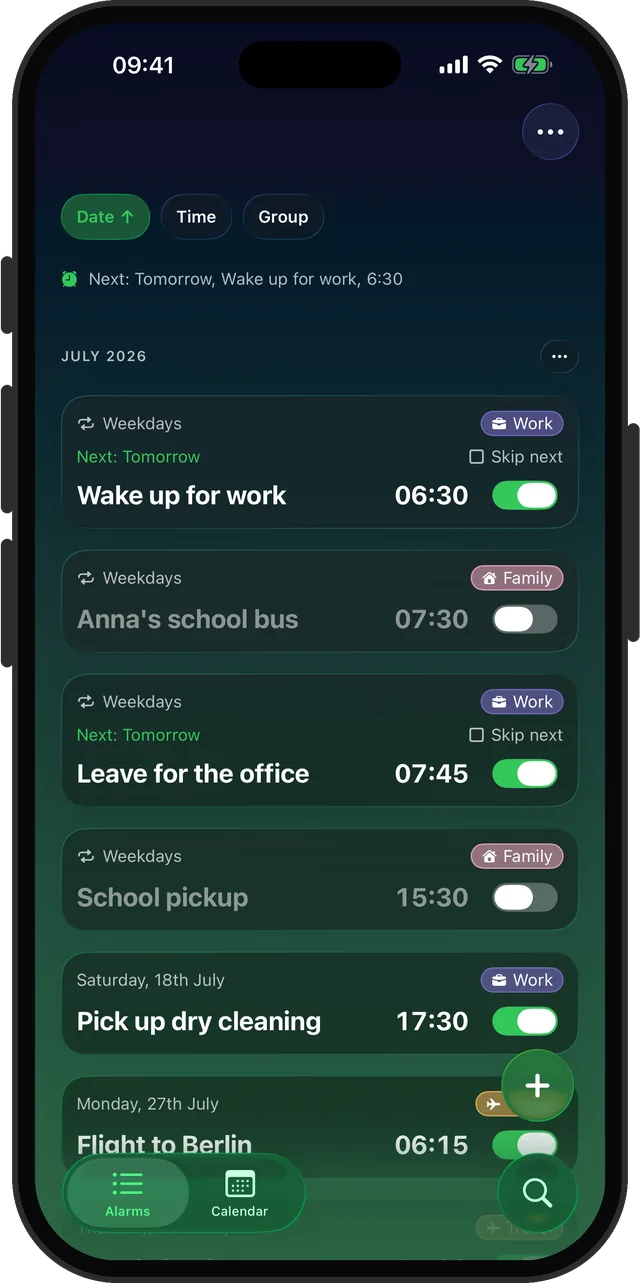
- Set your wake-up time and name it, for example Flight to Berlin.
- Tag it Travel, so every trip alarm lives in one color-coded group.
Add the supporting cast as separate alarms in the same group: online check-in the day before, leave for the airport, pick up the rental car. If plans change, you can bulk-edit or toggle the whole Travel group at once instead of hunting through a flat list.
Why it will actually ring
Alarm Clock Planner is built on Apple's AlarmKit framework, the same alarm machinery the system uses. Alarms ring through the Silent switch, Do Not Disturb, and Focus modes, and everything runs on the device, so a dead hotel Wi-Fi connection changes nothing. The only rule that still applies is the universal one: the phone has to be on, so charge it overnight.
Do the return leg too
Set both legs while you are at it. One-off alarms archive themselves after they fire, so the trip cleans up after itself and your alarm list is empty again when you are home.
Book the flight, set the alarm, close the loop
Free for up to 3 alarms. Rings on Silent, works offline.